
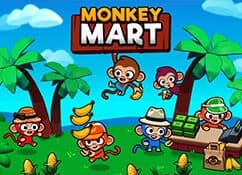
About Monkey Mart
Monkey Mart is a cheerful management game in which one busy monkey turns a small produce stand into a thriving supermarket. You begin by harvesting simple crops, carrying them to the correct shelf, and serving customers at the checkout. Every completed sale earns coins that can be invested in new aisles, better products, faster movement, and helpful employees. The loop is easy to understand, but the store becomes increasingly lively as more customers and product lines arrive.
The most satisfying part of Monkey Mart online play is deciding what needs attention next. Empty shelves stop customers from buying, a queue at the register slows down income, and uncollected crops leave useful stock sitting in the field. Walking an efficient route matters. Strong players collect several items, refill nearby shelves, help at checkout, and spend coins on upgrades before a small problem grows into a crowded store.
Progression brief
Starting point
- Core objective
- Stock shelves, serve shoppers, and reinvest earnings into a faster, larger, and more efficient market.
- Genre
- Management Games and Idle Games
- Players
- SinglePlayer
- Mobile support
- Keyboard movement plus mouse or touch interaction is recommended for carrying items and selecting upgrades.
Monkey Mart Progression Path
The shop grows through products, shelves, staff, and upgrades. Each expansion adds a new logistics decision instead of only increasing a score.
The Monkey Mart Loop
Monkey Mart links movement to an idle-style economy. The player carries products from production or storage to shelves, then earns money when shoppers complete purchases.
Store layout affects efficiency. A short path between supply and shelf means more restocks per minute, while unlocking staff or new products changes the amount of work that can be automated.
Monkey Mart Upgrade Priorities
- Keep the highest-demand shelf stocked first.
- Reinvest early earnings into the bottleneck you feel most often.
- Place routes so restocking does not cross the busiest shopper area.
Monkey Mart Progression Traps
Unlocking a new product while shelves are empty
Stabilize current demand before expanding the store.
Walking the longest route repeatedly
Plan a restock loop that groups nearby shelves.
More Games Like Monkey Mart
Play Doge Miner - Doge Miner is mostly passive production; Monkey Mart adds direct movement and shelf logistics.
Play Tiny Fishing - Tiny Fishing upgrades a single fishing route, while Monkey Mart manages several products and customer paths.
Monkey Mart Controls
Use the movement keys shown in game to walk between supply points and shelves, then follow prompts for stocking and upgrades.
Desktop Controls
- Use WASD or the Arrow keys to walk around the market.
- Move onto crops, shelves, upgrade stations, and checkout areas to interact automatically.
Mobile Controls
- Mobile support may depend on the game version and device.
- For the most reliable experience, use a modern desktop browser with keyboard and mouse controls when available.
Monkey Mart Features
- Free browser game
- No download required
- Instant play on Eovant
- Fullscreen support
- Responsive game window
- Quick replayable sessions
- Keyboard and mouse support
Frequently Asked Questions About Monkey Mart
Is Monkey Mart online free to play?
Yes. Monkey Mart online is free to play online on Eovant with no installation required.
How do I play Monkey Mart?
Move with WASD or the Arrow keys, collect products, stock the matching shelves, serve customers, and spend earnings on upgrades.
Can I play Monkey Mart without downloading it?
Yes. The complete game loads directly in a modern web browser.
What should I upgrade first in Monkey Mart?
Prioritize the bottleneck you encounter most often, usually carrying capacity, movement speed, checkout speed, or an employee for a busy shelf.
Does Monkey Mart work on mobile?
Mobile support depends on the game build, browser, and device performance.
How do I play Monkey Mart online?
Grow a busy market, harvest fresh produce, stock shelves, and serve a steady line of customers. Open the game above to start directly in your browser without a separate installation.
What are the Monkey Mart controls?
Use WASD or the Arrow keys to walk around the market. Move onto crops, shelves, upgrade stations, and checkout areas to interact automatically.
Is Monkey Mart multiplayer?
Monkey Mart is a single-player browser game.
Games Like Monkey Mart






Explore by play style
More Monkey Mart Games
Find similar browser games by mechanic, pace, or match style. Each collection includes direct game links and a short guide to choosing where to play next.